Dashboard and Performance
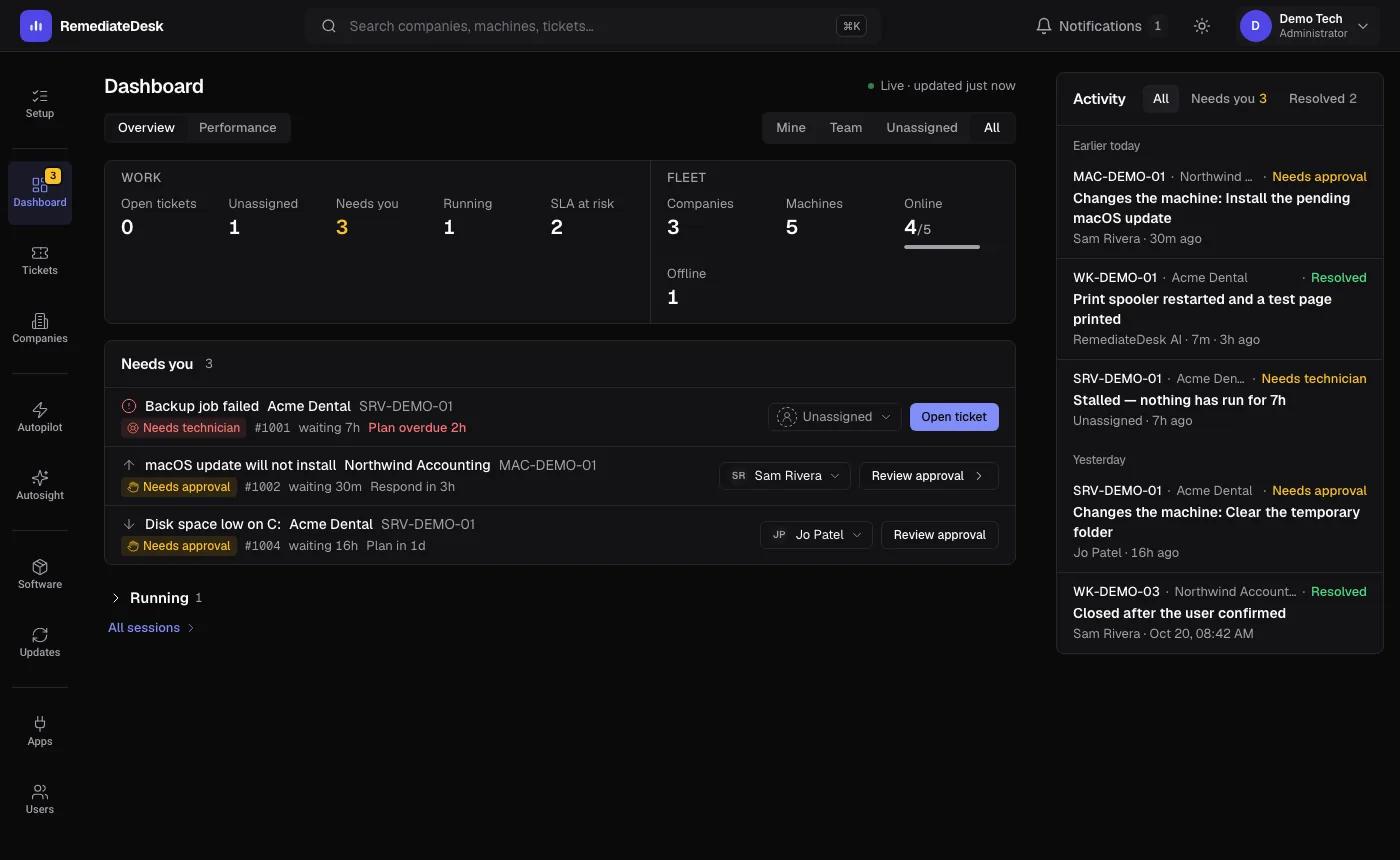
The Dashboard answers one question: what needs a person right now. Performance answers a slower one: how well is the AI actually doing.
The Dashboard
At the top, a switch chooses whose tickets you see: Mine, Team, Unassigned, All. Mine follows the assignee in Autotask unless someone has reassigned it inside RemediateDesk. The same choice filters the counts and the feed below.
The stat bar
Two groups share one bar. Work counts what a technician has to deal with: Open tickets, Unassigned, Needs you, Running, SLA at risk, Unexpected offline. Fleet describes the estate: Companies, Machines, Online, Offline. A stat that filters the queue is a button, and one that goes somewhere is a link. Colour is reserved for things that need attention, so a calm bar means a calm day.
The queue
Each row is a session in one of five states. Needs approval and Needs technician sort first, because those are the two that wait for you. The order is not by age alone. Severity carries the most weight, then how close the ticket is to its due time, then how long it has waited. The weights are chosen so a Critical ticket that has sat idle always ranks above a Low one waiting on an approval.
A row can say Closed in Autotask with a step left. That means a colleague closed the ticket in the PSA while the AI still had a step outstanding. It is a flag on the row, not a sixth state.
An approval can be decided right in the row. If the proposal changed after you opened it, the approval is refused and you are shown the new one, so you never approve something you have not seen.
Performance
Performance is in the same area of the app and answers how the AI is doing over time. It reads the recorded outcome of each session, so it only knows about sessions that reached a conclusion.
| Section | What it shows |
|---|---|
| Resolution scorecard | Counts of sessions by how they ended, including how many were handled without a technician and how many came back. |
| Who led the work | Who did the work on resolved tickets: the AI, a technician with the AI, or a technician alone. |
| Does the PSA agree? | Tickets the AI called resolved, compared with what Autotask itself says. |
| Automation impact | What your Autopilot instructions have done in total. |
| Did it help? | The thumbs your team left under session results. |
| By problem type | Results grouped by the kind of problem. |
| Month over month | A trend that builds up month by month from when tracking began. |