Tickets
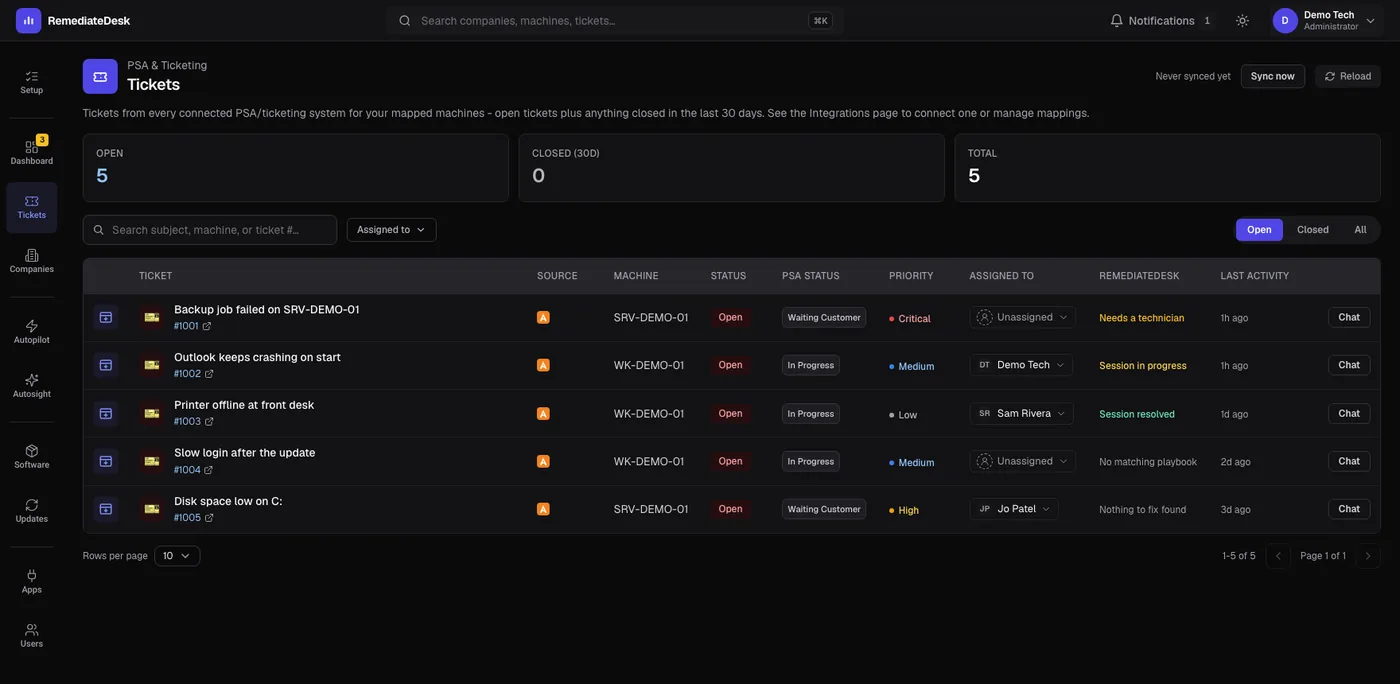
Tickets is a view of your PSA with one extra column: what RemediateDesk is doing about each one.
Reading the table
Use Open, Closed, All to choose which tickets to list, and the search box and the assignee filter to narrow them further. The columns are Ticket, Source, Machine, Status, PSA status, Priority, Assigned to, RemediateDesk, Last activity. Click a header to sort.
The Status column is RemediateDesk's view, and PSA status is the status as Autotask shows it. They can differ, and that is useful: a ticket still open in Autotask can already be resolved here.
| In the RemediateDesk column | Meaning |
|---|---|
| Session in progress | A session is working on it now. |
| Resolved by Autopilot | A saved instruction handled it from start to finish. |
| Session resolved | A session finished and checked the fix. |
| Needs a technician | The AI stopped and a person has to take over. |
| Nothing to fix found | The AI looked and found nothing wrong to fix. |
| No matching playbook | No saved instruction matches the problem, so nothing started on its own. |
What you can do from here
- Chat opens the ticket's own conversation with the machine behind it. On an open ticket it also queues the usual request to work the problem; on a closed one it just lets you read what happened.
- The small icon at the start of a row opens the ticket in a new browser tab, so the table keeps your place. The number beside a ticket title links to the ticket in Autotask.
- Sync now fetches fresh tickets from Autotask immediately instead of waiting for the next two-minute check.
- Agent not installed - fix mapping appears when the machine is not known, and takes you to the mapping screen.
The assignee shown is either the one in Autotask or one set inside RemediateDesk. Setting it inside RemediateDesk affects the Mine and Team views and does not change the ticket in Autotask.
Why a ticket might be missing
The page shows a local copy of your tickets that is refreshed on a schedule, so it opens quickly. A ticket created a moment ago may need a sync. A status you have not placed in either the open or closed list will not appear in the Open or Closed views; fix that on the Autotask connection screen.